



यार, यह सवाल मुझे सबसे ज़्यादा मिलता है।
“भाई, मेरे 50,000 views आए — कितने पैसे मिलेंगे?” “1 lakh subscribers पर monthly कितना आता है?” “YouTube AdSense income actually कितनी realistic है?”
और सच बताऊं तो — इंटरनेट पर ज़्यादातर answers बहुत vague होते हैं। “Depends on niche” बोल कर लोग टाल देते हैं।
आज मैं तुम्हें exact numbers दूंगा — niche-wise, subscriber-wise, सब कुछ। साथ में यह भी बताऊंगा कि YouTube AdSense account कैसे बनाएं, YouTube AdSense criteria क्या है, YouTube AdSense connection कैसे करें, और एक practical YouTube AdSense earnings calculator भी बनाऊंगा जिससे तुम खुद अपनी estimated income निकाल सको।
चलो शुरू करते हैं — पूरी honesty के साथ।
YouTube AdSense Kya Hai? Quick Recap
YouTube AdSense Income वो revenue है जो तुम्हें Google की तरफ से मिलता है जब advertisers तुम्हारी videos पर ads दिखाते हैं।
Simple Flow:
Advertiser → Google को पैसे देता है
Google → तुम्हारी video पर ad दिखाता है
Viewer → Ad देखता/click करता है
Revenue Generate होता है
तुम्हें मिलता है 55%, Google रखता है 45%
यह तुम्हारी पूरी income का सिर्फ एक हिस्सा है — लेकिन ज़्यादातर creators के लिए यह पहला और main income source होता है।
YouTube AdSense Account Kaise Banaye
Step 1: AdSense Website पर जाओ
google.com/adsense पर जाओ और अपने Google account से sign in करो।
Step 2: Details भरो
- Website/Channel URL डालो
- Country select करो — India
- Payment address details भरो (postal code सही हो — verification में important है)
Step 3: Account Type Select करो
- Individual — ज़्यादातर creators के लिए correct option
- Business — अगर registered business है
Step 4: PIN Verification
Google तुम्हारे address पर एक PIN code भेजता है physical mail से। यह आने में 2-4 हफ्ते लग सकते हैं — इसे verify करना ज़रूरी है payment के लिए।
Step 5: Tax Information
PAN card details add करो — TDS calculation के लिए ज़रूरी है।
YouTube AdSense Criteria — Eligibility Requirements
YouTube AdSense criteria समझना बहुत important है — बिना यह पूरा किए monetization possible नहीं hai तो पहले यह समझ लेते हैं कि ऐडसेंस के लिए क्या-क्या रिक्वायरमेंट चाहिए होती है एक यूट्यूब के लिए और आपको क्या-क्या क्राइटेरिया पूरा करना पड़ता है तो यहां पर एक कंपलीट टेबल बनाकर मैंने बताया है
YouTube Partner Program (YPP) Requirements
| Requirement | Details |
|---|---|
| Subscribers | 1,000+ |
| Watch Hours | 4,000+ (पिछले 12 महीनों में) |
| OR Shorts Views | 10 Million (पिछले 90 दिनों में) |
| Age | 18+ |
| Two-Factor Authentication | Enable होना चाहिए |
| Community Guidelines | कोई active strikes नहीं |
| Country | YPP available देश में (India ✅) |
Channel Standing Criteria
- कोई copyright strikes active नहीं होनी चाहिए
- Community Guidelines violations नहीं होनी चाहिए
- Content “advertiser-friendly” होना चाहिए — guidelines.google.com पर detailed policy है
AdSense Account Criteria
- एक व्यक्ति का सिर्फ एक AdSense account हो सकता है
- Account suspended history नहीं होनी चाहिए
- Valid payment information ज़रूरी है
YouTube AdSense Connection — Channel Se Link Kaise Karein
जब YPP requirements पूरी हो जाएं — तब यह steps follow कर sakte hai –
Step 1: YouTube Studio खोलो
studio.youtube.com → Left sidebar → “Monetization”
Step 2: Apply for YPP
“Apply” या “Sign up” button दिखेगा अगर requirements पूरी हैं।
Step 3: AdSense Connection करो
- अगर पहले से AdSense account है → उसे select करो
- नया account बनाना है → “Create new AdSense account” select करो
Step 4: Review और Confirm करो
सारी details verify करो — channel name, country, payment info।
Step 5: Submit करो — Review का Wait करो
YouTube तुम्हारी channel review करेगा — 1 से 30 दिन लग सकते हैं।
Approval के बाद: Ads automatically enable नहीं होते — तुम्हें per-video monetization settings check करनी पड़ती है (Video Edit → Monetization)।
CPM Kya Hota Hai — Income Calculate Karne Ka Base
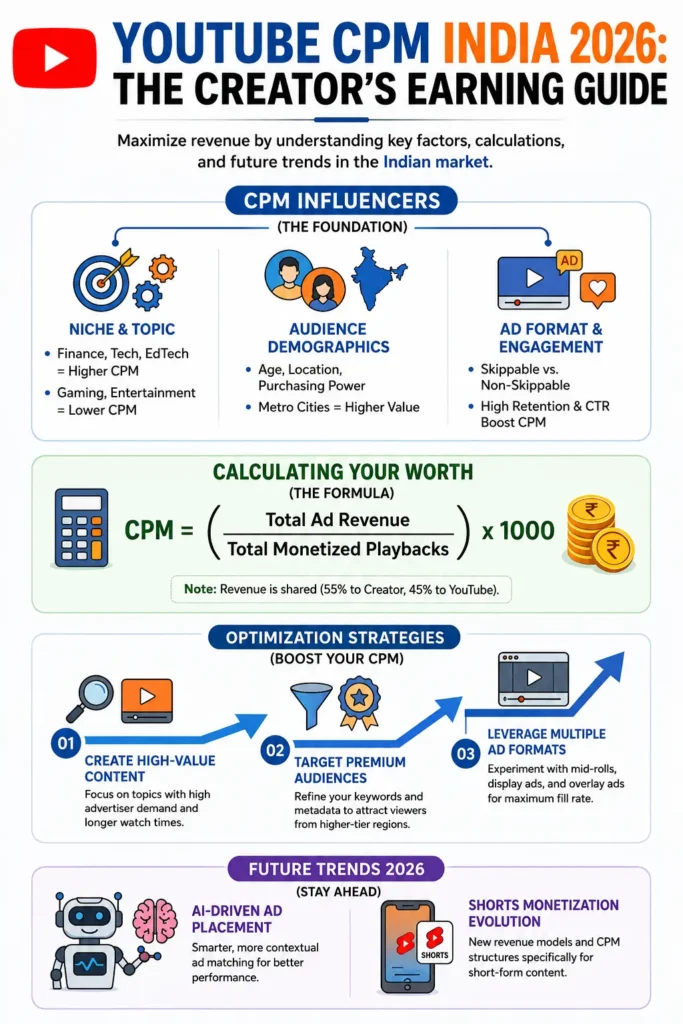
CPM (Cost Per Mille) = 1,000 views पर advertiser कितना pay करता है।
यह सबसे important concept है YouTube AdSense income समझने के लिए।
CPM को Affect करने वाले Factors:
- Niche (topic)
- Viewer का location (US/UK viewers से ज़्यादा CPM)
- Season (Q4/festive season में CPM ज़्यादा)
- Ad format (skippable vs non-skippable)
- Video length (लंबी videos में ज़्यादा ads fit होते हैं)
Top Niches Se Monthly Income — Real Numbers
यह वो section है जो तुम ढूंढ रहे हो।
Niche-wise CPM Table (India 2026)
| Niche | CPM Range (₹) | क्यों |
|---|---|---|
| Finance/Investment | ₹300 – ₹900 | High-value advertisers, insurance/banking ads |
| Tech/Gadget Reviews | ₹150 – ₹450 | Direct purchase intent, electronics ads |
| Education/Career | ₹120 – ₹350 | EdTech companies aggressive spending |
| Health/Fitness | ₹100 – ₹300 | Pharma, supplement advertisers |
| Business/Marketing | ₹150 – ₹400 | B2B advertisers, SaaS companies |
| Cooking/Food | ₹60 – ₹180 | FMCG brands, kitchen products |
| Gaming | ₹50 – ₹150 | Large advertiser pool, lower per-click value |
| Entertainment/Comedy | ₹40 – ₹120 | High volume लेकिन lower commercial intent |
| Vlogs/Lifestyle | ₹50 – ₹150 | Variable, depends on engagement |
| News/Current Affairs | ₹80 – ₹200 | News-related advertisers |
Top 3 Niches — Monthly Income Example (1 Lakh Views पर)
1. Finance/Investment Channel:
Views: 1,00,000/month
CPM: ₹500 (average)
Gross Revenue: (1,00,000/1000) × ₹500 = ₹50,000
Creator Share (55%): ₹27,500/month
2. Tech/Gadget Channel:
Views: 1,00,000/month
CPM: ₹300 (average)
Gross Revenue: (1,00,000/1000) × ₹300 = ₹30,000
Creator Share (55%): ₹16,500/month
3. Education Channel:
Views: 1,00,000/month
CPM: ₹200 (average)
Gross Revenue: (1,00,000/1000) × ₹200 = ₹20,000
Creator Share (55%): ₹11,000/month
Yह data clearly दिखाता है — same views के साथ भी, niche के हिसाब से income में 2.5x तक का फर्क आ सकता है।
YouTube AdSense Earnings Calculator — Kaise Use Karein
बहुत लोग search करते हैं — “YouTube AdSense earnings calculator” — लेकिन Google का कोई official calculator नहीं है। यहाँ practical तरीके हैं जिसका उसे करके आप अपनी ऐडसेंस अर्निंग को कैलकुलेट कर सकते हो youtube growth hacking
Method 1: Manual Formula (सबसे Accurate)
Estimated Monthly Income =
(Monthly Views ÷ 1000) × Niche CPM × 0.55
Example:
Views: 50,000/month
Niche: Tech (CPM ₹300)
Calculation: (50,000/1000) × 300 × 0.55
= 50 × 300 × 0.55
= ₹8,250/month
Method 2: Third-Party Calculator Tools
1. Social Blade socialblade.com पर channel URL डालो — estimated earnings range मिलता है।
2. Influencer Marketing Hub Calculator Views, niche, और engagement rate डालकर estimate निकाल सकते हो।
3. NoxInfluencer Detailed channel analytics के साथ earnings estimate देता है।
Important Note: यह सब tools “estimates” देते हैं — actual numbers AdSense account में ही पता चलते हैं। Real CPM बहुत factors पर depend करता है।
Method 3: अपना Personal Calculator बनाओ (Google Sheets)
Column A: Month
Column B: Total Views
Column C: Your Niche CPM (research करके डालो)
Column D: Formula = (B/1000)*C*0.55
Column E: Actual AdSense Earning (verify करने के लिए)
हर महीने actual data डालकर अपनी estimate को refine करते रहो — यह सबसे accurate तरीका है YouTube AdSense earnings calculator बनाने का, क्योंकि यह तुम्हारे actual channel data पर based होता है।
Subscriber-wise Monthly Income Estimate
| Subscribers | Average Monthly Views | Estimated Income (Mixed Niche) |
|---|---|---|
| 1,000 – 10,000 | 20,000 – 1,00,000 | ₹500 – ₹8,000 |
| 10,000 – 50,000 | 1,00,000 – 5,00,000 | ₹8,000 – ₹40,000 |
| 50,000 – 1,00,000 | 5,00,000 – 10,00,000 | ₹40,000 – ₹1,00,000 |
| 1,00,000 – 5,00,000 | 10,00,000 – 50,00,000 | ₹1,00,000 – ₹5,00,000 |
| 5,00,000 – 10,00,000 | 50,00,000 – 1,00,00,000 | ₹5,00,000 – ₹15,00,000 |
| 10,00,000+ | 1 Crore+ | ₹15,00,000+ |
Important Disclaimer: यह सिर्फ AdSense estimate है — Affiliate, Sponsorships, और Digital Products add करने पर actual income इससे 2-5x ज़्यादा हो सकती है।
YouTube AdSense Payment Method — Kaise Paise Aate Hain
जब आपका ऐडसेंस कनेक्ट हो जाता है और आपके चैनल पर ऐड शो होने लगते हैं आपके viewers को तो उसके बाद आपकी पेमेंट बनने लग जाती है और आप यूट्यूब स्टूडियो में जाकर के भी देख सकते हो मोनेटाइजेशन section में जाकर के और adsense से पेमेंट निकालने के लिए आपको मिनिमम पर आउटसोर्डर का होता है वह कंप्लीट करना होता है उसके बाद ही आपका पेमेंट आपके अकाउंट में ट्रांसफर होता है और बाकी की प्रक्रिया आगे होती है adsense pin ki.
Payment Threshold
Minimum Payout: $100 (≈₹8,300)
जब तक balance $100 नहीं पहुंचता — payment नहीं आएगी, बस accumulate होता रहेगा।
Payment Cycle
Month में Earning होती है
        ↓
Finalize होती है महीने के end में
        ↓
अगले महीने की 21st-26th तारीख के बीच AdSense balance में add होती है
        ↓
Threshold पूरा हो तो — अगले महीने bank transfer initiate होता है
YouTube AdSense Payment Methods Available in India
| Payment Method | Details |
|---|---|
| Bank Transfer (EFT) | सबसे common, directly bank account में |
| Wire Transfer | International transfer का option |
| Check | कम इस्तेमाल होता है अब |
India में सबसे popular: Direct Bank Transfer (Electronic Funds Transfer)
Bank Account Setup कैसे करें
- AdSense → Payments
- “Add payment method” क्लिक करो
- Bank account number, IFSC code डालो
- Verification हो जाने पर payments automatically उस account में आएंगी
Tax Deduction (TDS)
Google India payments पर TDS काटता है — applicable rates के अनुसार। Annual ITR file करना ज़रूरी है जब income regular हो जाए।
Income Ko Affect Karne Wale Factors
यह समझना ज़रूरी है — क्यों एक creator दूसरे से ज़्यादा कमाता है same views पर।
1. Viewer Location
US/UK/Canada के viewers से ad revenue भारत के viewers से ज़्यादा होता है — advertiser budgets अलग हैं।
2. Ad Blockers
ज़्यादा viewers ad blockers use करते हैं तो revenue कम होता है।
3. Video Length
8+ minute videos में mid-roll ads लग सकते हैं — ज़्यादा ad slots = ज़्यादा potential revenue।
4. Seasonal Trends
October-December (festive season) में CPM higher होता है advertisers ज़्यादा spend करते हैं।
5. Content Advertiser-Friendliness
Controversial/sensitive topics पर कम advertisers bid करते हैं — CPM कम होता है।
AdSense Income Badhane Ke Practical Tips
Tip 1: High-CPM Niche की तरफ Shift करो (अगर possible हो) अपने content में finance, tech, या education angles add करो जहाँ relevant हो।
Tip 2: Longer Videos बनाओ (Retention के साथ) 8-15 minute videos ज़्यादा ad slots allow करती हैं — लेकिन सिर्फ अगर retention अच्छी हो।
Tip 3: Mid-roll Ads Properly Place करो Natural breaks पर ads रखो — viewer experience खराब न हो।
Tip 4: International Audience Target करो English subtitles add करो — non-Indian viewers भी आ सकते हैं, higher CPM।
Tip 5: AdSense को अकेला मत छोड़ो Affiliate links, sponsorships, digital products साथ में करो — AdSense सिर्फ एक हिस्सा है।
और अगर आप अपना न्यूज़ चैनल है और उसको सेट करना चाहते हो तो हमारी बचा गाइड भी आप पढ़ सकते हो यूट्यूब चैनल सेटअप
Common Mistakes — AdSense Income Ke Saath
❌ Mistake 1: सिर्फ Views Count पर Focus करना Views ज़्यादा होने का मतलब income ज़्यादा नहीं — niche और CPM matter करते हैं।
❌ Mistake 2: AdSense Account Details गलत भरना Address verification में गलती से payment delay या account suspend हो सकता है।
❌ Mistake 3: Mid-roll Ads ज़्यादा Aggressively लगाना हर 2 minute में ad — viewers irritate होकर छोड़ देते हैं, retention drop होती है, long-term loss।
❌ Mistake 4: Tax Filing Ignore करना Regular income होने पर ITR filing ज़रूरी है — बाद में legal issues से बचने के लिए।
❌ Mistake 5: सिर्फ AdSense पर Survive करने की कोशिश यह सबसे common mistake है — AdSense supplementary income है, primary नहीं होनी चाहिए।
Conclusion + Action Plan
यार, अब तुम्हें YouTube AdSense income की पूरी picture मिल गई है — real numbers के साथ।
Key Takeaways:
✅ YouTube AdSense criteria — 1,000 subs + 4,000 watch hours (या 10M Shorts views) ✅ YouTube AdSense account बनाना आसान है — सिर्फ verification में time लगता है ✅ YouTube AdSense connection — YouTube Studio से directly link होता है ✅ Niche सबसे बड़ा factor है — Finance/Tech CPM Entertainment से 5x तक ज़्यादा हो सकता है ✅ YouTube AdSense payment method — Bank transfer, $100 threshold, monthly cycle ✅ YouTube AdSense earnings calculator — खुद का Google Sheets बनाओ actual data के साथ
🎯 Action Plan — आज से शुरू करो
आज:
- अपनी niche का average CPM research करो (ऊपर table से reference लो)
- AdSense account बनाओ अगर अभी नहीं है
इस हफ्ते:
- अपना personal earnings calculator (Google Sheets) बनाओ
- हर video पर monetization settings check करो
इस महीने:
- अगर niche flexible है — कुछ high-CPM angles try करो (finance tips, tech reviews आदि)
- AdSense के साथ affiliate links भी add करना शुरू करो
याद रखो: AdSense एक शुरुआत है, पूरी कहानी नहीं। असली sustainable income AdSense + Affiliate + Sponsorships + Digital Products के combination से आती है।
कोई सवाल है? Comment में पूछो — personally reply करूंगा।
आप इन FAQs को अपने आर्टिकल में सीधे जोड़ सकते हैं:
FAQ (Frequently Asked Questions)
1. यूट्यूब की 1 महीने की इनकम कितनी होती है?
YouTube की मासिक आय पूरी तरह चैनल के Niche, Audience Location, RPM, CPM और Views पर निर्भर करती है। कुछ क्रिएटर्स ₹1,000–₹10,000 प्रति माह कमाते हैं, जबकि बड़े चैनल लाखों रुपये प्रति माह की कमाई करते हैं।
2. यूट्यूब पर $10,000 प्रति माह बनाने के लिए मुझे कितने व्यूज चाहिए?
यह आपके RPM (Revenue Per Mille) पर निर्भर करता है। यदि आपका RPM $3–$5 है, तो लगभग 20 लाख से 35 लाख (2–3.5 Million) मासिक Views की आवश्यकता हो सकती है। High-CPM Niches में इससे कम Views पर भी $10,000 प्रति माह कमाए जा सकते हैं।
3. 500 सब्सक्राइबर पूरे होने पर क्या मिलता है?
500 Subscribers और आवश्यक Watch Time/Shorts Views पूरे होने पर YouTube Partner Program (YPP) के शुरुआती फीचर्स के लिए पात्रता मिल सकती है, जैसे Channel Memberships, Super Chat, Super Thanks और Shopping Features (क्षेत्र के अनुसार उपलब्धता अलग हो सकती है)।
4. 1 Million (10 लाख) Views पर कितने पैसे मिलते हैं?
1 Million Views पर कमाई RPM और Audience Location के अनुसार काफी अलग हो सकती है। आमतौर पर 1 Million Views पर लगभग $500 से $5,000 या उससे अधिक की कमाई हो सकती है।
5. YouTube 1 दिन में कितना कमाता है?
YouTube स्वयं दुनिया के सबसे बड़े वीडियो प्लेटफॉर्म्स में से एक है और विज्ञापनों, Premium Memberships तथा अन्य सेवाओं से प्रतिदिन करोड़ों डॉलर की आय उत्पन्न करता है। इसकी सटीक दैनिक कमाई सार्वजनिक रूप से घोषित नहीं की जाती।