






















एक छोटी सी file है जो तुम्हारी पूरी website की SEO बना भी सकती है और बर्बाद भी कर सकती है उसका नाम है — robots.txt।
मैंने खुद एक बार यह गलती की थी — robots.txt में एक wrong line थी जिसने Google को पूरी site crawl करने से रोक दिया। Traffic अचानक drop हुआ, Google Search Console में errors आए — तब जाकर समझ आया यह file कितनी important है।
अगर तुम्हें robots.txt के बारे में कुछ नहीं पता — तो यह guide तुम्हारे लिए है। और अगर थोड़ा बहुत पता है — तो इस guide में वो advanced tips भी हैं जो ज़्यादातर Hindi articles में नहीं मिलतीं।
चलो शुरू करते हैं — A से Z तक complete जानकारी बताइ है

Robots.txt File Kya Hoti Hai?
Robots.txt एक simple text file है जो तुम्हारी website के root directory में रहती है और search engine bots (crawlers) को बताती है — कहां जाना है और कहां नहीं जाना।
यह file publicly accessible होती है। कोई भी इसे देख सकता है — बस browser में type करो
https://yoursite.com/robots.txt
Example: BaseGrower की robots.txt देखनी हो तो: बड़ी आसानी से आप देख सकते हो
https://basegrower.com/robots.txt
यह file plain text में होती है — कोई HTML नहीं, कोई CSS नहीं, बस simple instructions।
Robots.txt Ka Matlab Kya Hota Hai?
“Robots” = Search engine bots/crawlers (Googlebot, Bingbot, etc.) “txt” = Plain text file format
जब Googlebot तुम्हारी site visit करता है, तो सबसे पहले robots.txt file check करता है।
यह file एक “Security Guard” की तरह है — जो bots को बताती है:
- “यहां आ सकते हो” ✅
- “यहां मत आओ” ❌
- “यह sitemap देखो” 📍
एक Real-Life Example: मान लो तुम्हारी एक e-commerce site है। तुम्हारे admin panel (/wp-admin/), checkout pages, और duplicate tag pages को Google index करने की ज़रूरत नहीं। Robots.txt से तुम इन्हें block कर सकते हो।
Robots.txt File क्यों ज़रूरी है?
बहुत लोग सोचते हैं — “मेरा content अच्छा है, robots.txt की क्या ज़रूरत?” यह सोच गलत है।
5 Reasons क्यों Robots.txt ज़रूरी है:
1. Crawl Budget बचाओ: Google हर site को limited time (crawl budget) देता है। अगर Google unnecessary pages crawl करे — important pages crawl होने से रह जाती हैं। Robots.txt से useless pages block करके important pages की crawling ensure होती है।
2. Sensitive Pages Hide करो: Admin pages, login pages, internal search results — इन्हें Google index नहीं करना चाहिए। Robots.txt से block करो।
3. Duplicate Content Avoid करो: Tag pages, category archives, URL parameters — यह duplicate content create कर सकते हैं। Block करके SEO clean रखो।
4. Staging Sites Protection: Development या staging site को accidentally index होने से बचाओ।
5. Sitemap Submit करो: Robots.txt में sitemap URL add करने से Google directly sitemap find कर लेता है।
Pro Tip: Robots.txt indexing stop करने का foolproof तरीका नहीं है; sensitive content को password-protect करना best है.
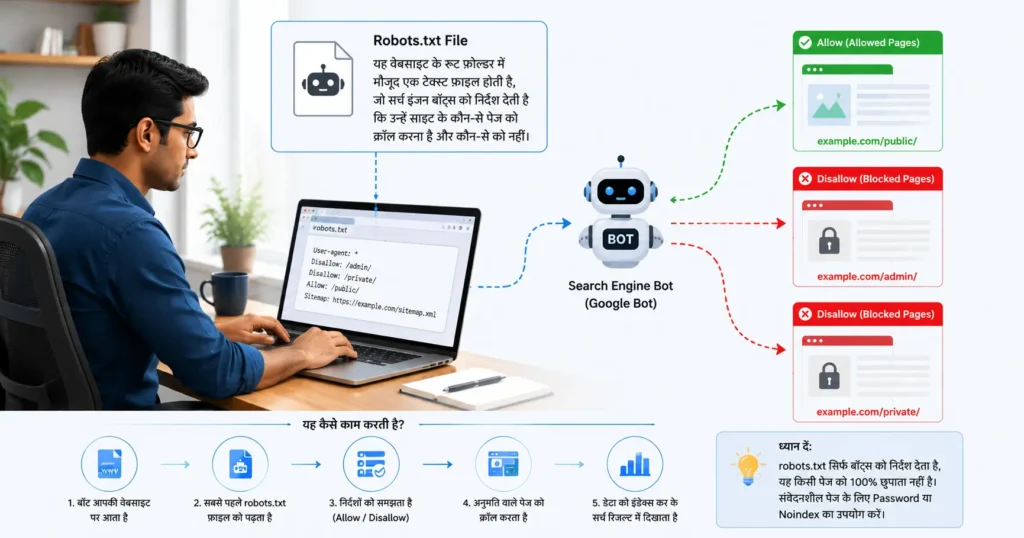
Robots.txt File कैसे काम करती है?
जब कोई crawler आपकी site पर आता है, वह पहले https://yoursite.com/robots.txt चेक करता है।
- अगर file मिल गई, तो वो matching user-agent वाले rules पढ़ता है।
- फिर वो pages crawl करता है allowed paths के हिसाब से।
- Disallow paths को generally skip करता है (हालाँकि external links से वो URLs discover हो सकते हैं)।
Step-by-Step Process:
Googlebot → Site Visit करता है
     ↓
https://yoursite.com/robots.txt check करता है
     ↓
Instructions पढ़ता है
     ↓
Allowed pages crawl करता है
     ↓
Blocked pages skip करता है
     ↓
Crawled content index होता है
Important Points:
1. यह Request है, Command नहीं: Robots.txt bots को “request” करती है — technically कोई भी bot इसे ignore कर सकता है। Google, Bing जैसे legitimate bots follow करते हैं, लेकिन malicious scrapers ignore कर सकते हैं।
2. Indexing और Crawling अलग हैं:
- Block crawling = Bot page visit नहीं करेगा
- Block indexing = Page index नहीं होगा
Robots.txt crawling block करता है — indexing block करने के लिए meta robots tag use होता है।
3. Propagation Time: Robots.txt change करने के बाद Google को कुछ घंटों से दिनों तक लग सकते हैं नई instructions pick करने में।
Robots.txt file kya hai full guide video:
Robots.txt File Structure Example
यह एक basic robots.txt file का structure है:
User-agent: *
Disallow: /wp-admin/
Disallow: /wp-login.php
Allow: /wp-admin/admin-ajax.php

Sitemap: https://yoursite.com/sitemap.xml
हर line का मतलब:
| Line | मतलब |
|---|---|
User-agent: * | सभी bots के लिए rules |
Disallow: /wp-admin/ | wp-admin folder block |
Allow: /wp-admin/admin-ajax.php | यह specific file allow है |
Sitemap: | Sitemap URL |
Basic Syntax
User-agent: किस bot के लिए rule है यह बताता है।
User-agent: *          # सभी bots
User-agent: Googlebot  # सिर्फ Google
User-agent: Bingbot    # सिर्फ Bing
User-agent: GPTBot     # OpenAI का crawler
Disallow: इस path को crawl मत करो।
Disallow: /          # पूरी site block (dangerous!)
Disallow: /admin/    # admin folder block
Disallow: /private/  # private folder block
Disallow:            # कुछ नहीं block (सब allow)
Allow: Disallow के बाद specific path को allow करना हो तो।
Allow: /public/      # public folder allow
Allow: /*.css$       # सभी CSS files allow
Allow: /*.js$        # सभी JS files allow
Crawl-delay: (Google officially support नहीं करता, Bing करता है)
Crawl-delay: 10 # 10 seconds wait between requests
Sitemap:
Sitemap: https://yoursite.com/sitemap.xml
Sitemap: https://yoursite.com/news-sitemap.xml
Wildcards:
*     # कोई भी characters (zero or more)
$     # URL का end
Example:
Disallow: /*.pdf$      # सभी PDF files block
Disallow: /*?*         # Query string वाले URLs block
Allow vs Disallow — Practical Examples
Example 1: Specific Page Block करो
User-agent: *
Disallow: /thank-you/
Disallow: /cart/
Disallow: /checkout/
Example 2: Specific Bot Block करो
User-agent: GPTBot
Disallow: /

User-agent: CCBot
Disallow: /
(AI training crawlers को block करना चाहते हो तो)
Example 3: Parameters Block करो
User-agent: *
Disallow: /*?s=
Disallow: /*?replytocom=
(WordPress search results और comment reply URLs block)
Example 4: Subdirectory Allow करो जब Parent Blocked हो
User-agent: *
Disallow: /members/
Allow: /members/public/
Example 5: Multiple Bots के लिए अलग Rules
User-agent: Googlebot
Disallow: /no-google/

User-agent: Bingbot
Disallow: /no-bing/

User-agent: *
Disallow: /private/
Sitemap को Robots.txt में कैसे Add करें
यह सबसे important best practice है।
User-agent: *
Disallow: /wp-admin/
Allow: /wp-admin/admin-ajax.php

Sitemap: https://yoursite.com/sitemap_index.xml
Multiple Sitemaps:
Sitemap: https://yoursite.com/sitemap_index.xml
Sitemap: https://yoursite.com/news-sitemap.xml
Sitemap: https://yoursite.com/video-sitemap.xml
Important: Sitemap line कहीं भी add हो सकती है — top पर, bottom पर, anywhere। यह किसी User-agent block के अंदर नहीं होनी चाहिए।
Rank Math/Yoast से Sitemap URL कहां मिलेगा:
- Rank Math:
yoursite.com/sitemap_index.xml - Yoast:
yoursite.com/sitemap_index.xml - Manual XML:
yoursite.com/sitemap.xml
Robots.txt File कहाँ और कैसे बनाएं?
Robots.txt file हमेशा root directory में होती है।
✅ https://yoursite.com/robots.txt       (सही)
❌ https://yoursite.com/blog/robots.txt  (गलत)
❌ https://yoursite.com/seo/robots.txt   (गलत)
Method 1: Manually Create करो (cPanel/Hostinger)
- Hosting cPanel में login करो
- File Manager open करो
- public_html folder में जाओ
- New File →
robots.txtनाम दो - Content add करो
- Save करो
Method 2: Notepad से Create करो
- Notepad (Windows) open करो
- Content लिखो
- “Save As” → File name:
robots.txt - Encoding: UTF-8 (important!)
- FTP से upload करो root directory में
WordPress में Robots.txt कैसे बनाएं
WordPress में robots.txt बनाने के 3 तरीके हैं:
Method 1: Rank Math से (सबसे Easy — Recommended)
- WordPress Dashboard → Rank Math
- General Settings → Edit robots.txt
- अपना content add करो
- Save Changes
Rank Math automatically robots.txt generate और manage करता है।
Method 2: Yoast SEO से
- Yoast SEO → Tools
- File Editor
- Robots.txt section में edit करो
- Save Changes to robots.txt
Method 3: Manually (Virtual Robots.txt)
WordPress में actual robots.txt file नहीं होती unless तुम create करो। WordPress virtual robots.txt generate करता है automatically।
Physical file create करना:
- Hosting File Manager →
public_html robots.txtfile बनाओ- Content add करो
Note: Physical file virtual file को override करती है।
WordPress Default Virtual Robots.txt:
User-agent: *
Disallow: /wp-admin/
Allow: /wp-admin/admin-ajax.php
यह basic है — Rank Math या Yoast से customize करो।
Blogger/Blogspot में Robots.txt file कैसे Add करें
Blogger में robots.txt अलग तरह से manage होती है।
Step-by-Step:
- Blogger Dashboard में login करो
- Left sidebar में Settings click करो
- Scroll down करो → Crawlers and indexing section
- Custom robots.txt option ढूंढो
- Enable करो → Text box में robots.txt content paste करो
- Save करो
Blogger के लिए Recommended Robots.txt file
User-agent: Mediapartners-Google
Allow: /

User-agent: *
Disallow: /search
Allow: /

Sitemap: https://yourblog.blogspot.com/sitemap.xml
Blogger-Specific Notes:
/searchblock करना ज़रूरी है — Blogger search results duplicate content create करते हैंMediapartners-Googleको allow करो — यह AdSense का bot है- Sitemap URL
sitemap.xmlहोती है Blogger में
Blogger/Blogspot me Robots.txt file kaise add kare full guide video:👇👇
Robots.txt File के फायदे और नुकसान
फायदे ✅
1. Crawl Budget Optimization: Large sites के लिए crawl budget बहुत important है। Useless pages (tags, authors, search results) block करके important pages की crawling ensure होती है।
2. Privacy और Security: Admin pages, login pages, internal tools — इन्हें block करके site की privacy maintain होती है।
3. Duplicate Content Prevention: URL parameters, session IDs, और filter pages — इन्हें block करके duplicate content issues avoid होती हैं।
4. Server Load Reduce: Aggressive bots को block करके server resources बचते हैं।
5. Staging Environment Protection: Development sites को accidentally index होने से बचाया जा सकता है।
6. Fast Sitemap Discovery: Sitemap robots.txt में add करने से Google quickly discover करता है।
नुकसान / Limitations ⚠️
1. 100% Block नहीं होता: Robots.txt request है, command नहीं। Malicious bots ignore कर सकते हैं।
2. Blocked Pages Still Indexed हो सकती हैं: अगर किसी और site ने तुम्हारी blocked page link की है — Google उस page को index कर सकता है (बिना crawl किए)।
3. Sensitive Data छुपाने के लिए Not Ideal: Real sensitive data के लिए password protection या server-level restrictions use करो।
4. Syntax Errors Dangerous हैं: एक गलत line पूरी site की crawling block कर सकती है।
5. Case Sensitive है: /Admin/ और /admin/ अलग-अलग हैं robots.txt में।
Common Robots.txt file Errors (2026) — और Fix
Error 1: Accidentally पूरी Site Block करना
Wrong:
User-agent: *
Disallow: /
यह line पूरी site को block कर देती है। Most dangerous mistake।
Fix:
User-agent: *
Disallow: /wp-admin/
Allow: /wp-admin/admin-ajax.php
कैसे पहचानें: Google Search Console में “Blocked by robots.txt” error आए।
Error 2: CSS/JS Files Block करना
Wrong:
User-agent: *
Disallow: /wp-content/
यह CSS, JavaScript, और images सब block कर देता है। Google page properly render नहीं कर पाता — ranking hurt होती है।
Fix:
User-agent: *
Disallow: /wp-admin/
Allow: /wp-content/
Error 3: Noindex in Robots.txt (Deprecated)
Wrong:
User-agent: *
Noindex: /private-page/
Google ने March 2022 में robots.txt में noindex directive support बंद कर दिया।
Fix: Noindex के लिए meta robots tag use करो:
<meta name="robots" content="noindex, nofollow">
या Rank Math/Yoast में post-level settings से।
Error 4: Wrong Wildcard Usage
Wrong:
Disallow: /category*    # Space missing नहीं है लेकिन pattern गलत
Disallow: *.pdf         # Wildcard position गलत
Correct:
Disallow: /category/    # Trailing slash ज़रूरी
Disallow: /*.pdf$       # Correct wildcard pattern
Error 5: Sitemap URL गलत या Missing
Wrong:
Sitemap: /sitemap.xml                    # Relative URL — wrong
Sitemap: http://yoursite.com/sitemap.xml # HTTP — wrong (use HTTPS)
Correct:
Sitemap: https://yoursite.com/sitemap_index.xml
Error 6: Case Sensitivity भूल जाना
Linux servers case-sensitive होते हैं।
Disallow: /Admin/     # Capital A — अलग path
Disallow: /admin/     # Lowercase a — अलग path
दोनों अलग-अलग हैं। जो path exactly exist करती है वही use करो।
Fix: दोनों variations add करो अगर sure नहीं हो:
Disallow: /Admin/
Disallow: /admin/
Google Search Console में Robots.txt कैसे Check/Monitor करें
Robots.txt Tester (Old Tool — Deprecated): Google ने dedicated robots.txt tester tool remove कर दिया है। लेकिन तुम अभी भी check कर सकते हो। see here google robots.txt file guide
Current Method — URL Inspection Tool:
- Google Search Console → URL Inspection
- कोई URL enter करो जो potentially blocked हो
- “Coverage” section में देखो
- अगर “Blocked by robots.txt” दिखे → issue है
Manual Check: Browser में type करो: https://yoursite.com/robots.txt File accessible है और content correct है — verify करो।
Third-Party Tools:
- SEMrush Site Audit — robots.txt issues automatically detect करता है
- Screaming Frog — Blocked URLs identify करता है
- Ahrefs Site Audit — Crawl issues report करता है
Google Search Console में Coverage Report:
- Left sidebar → Pages (Coverage)
- “Excluded” tab → “Blocked by robots.txt” section
- यहां सभी blocked URLs दिखती हैं
Robots.txt SEO Best Practices (2026)
✅ Best Practice 1: Simple रखो Complex rules = mistakes का chance। जितना simple उतना safe।
✅ Best Practice 2: Test करो Changes से पहले Online robots.txt tester tools use करो:
- technicalseo.com/tools/robots-txt-tester
- seochat.com/seo-tools/robots-txt-generator
✅ Best Practice 3: Sitemap Always Add करो
Sitemap: https://yoursite.com/sitemap_index.xml
✅ Best Practice 4: Important Content Block मत करो Blog posts, category pages, product pages — इन्हें कभी block मत करो।
✅ Best Practice 5: CSS और JS Allow रखो
Allow: /*.css$
Allow: /*.js$
Google pages render करने के लिए इन्हें ज़रूरत होती है।
✅ Best Practice 6: Trailing Slash Consistent रखो
Disallow: /private/ # Directory के लिए slash add करो
✅ Best Practice 7: Comments Add करो (Readability)
# Admin और Login Pages Block
User-agent: *
Disallow: /wp-admin/
Allow: /wp-admin/admin-ajax.php

# Sitemap
Sitemap: https://yoursite.com/sitemap_index.xml
✅ Best Practice 8: AI Crawlers Decision लो
# OpenAI crawlers block करना हो तो:
User-agent: GPTBot
Disallow: /

User-agent: ChatGPT-User
Disallow: /
Robots.txt Examples — Niche Wise
(A) Standard WordPress Blog
User-agent: *
Disallow: /wp-admin/
Disallow: /wp-login.php
Disallow: /xmlrpc.php
Disallow: /?s=
Disallow: /search/
Allow: /wp-admin/admin-ajax.php
Allow: /wp-content/uploads/

Sitemap: https://yoursite.com/sitemap_index.xml
(B) WooCommerce / E-commerce
User-agent: *
Disallow: /wp-admin/
Disallow: /cart/
Disallow: /checkout/
Disallow: /my-account/
Disallow: /wc-api/
Disallow: /?add-to-cart=
Disallow: /?orderby=
Disallow: /order-received/
Allow: /wp-admin/admin-ajax.php
Allow: /wp-content/uploads/

Sitemap: https://yoursite.com/sitemap_index.xml
(C) News/Magazine
User-agent: *
Disallow: /wp-admin/
Disallow: /search/
Disallow: /?s=
Disallow: /tag/
Disallow: /author/
Allow: /wp-admin/admin-ajax.php
Allow: /wp-content/uploads/

User-agent: Googlebot-News
Allow: /

Sitemap: https://yoursite.com/sitemap_index.xml
Sitemap: https://yoursite.com/news-sitemap.xml
(D) SaaS/Docs Site
User-agent: *
Disallow: /app/
Disallow: /dashboard/
Disallow: /admin/
Disallow: /api/
Disallow: /login/
Disallow: /signup/
Disallow: /billing/
Allow: /docs/
Allow: /blog/
Allow: /pricing/
Allow: /features/

Sitemap: https://yoursite.com/sitemap.xml
(E) Complete Block — Maintenance/Staging
User-agent: *
Disallow: /

# Staging site — do not index
# Remove this file before going live!
⚠️ Warning: यह file live site पर कभी मत रखो। Staging/development sites के लिए ही।
Robots.txt vs Meta Robots vs X-Robots-Tag
यह तीनों अलग-अलग हैं — confusion होना common है:
| Feature | Robots.txt | Meta Robots | X-Robots-Tag |
|---|---|---|---|
| कहां होता है | Root directory file | HTML <head> में | HTTP Header में |
| क्या करता है | Crawling control | Indexing control | Non-HTML files के लिए |
| Level | Site/Folder level | Page level | File level |
| Noindex possible? | नहीं (deprecated) | हां | हां |
| PDFs control? | Limited | नहीं | हां |
| Speed | Fast | Page load पर | Server response पर |
कब क्या use करें:
Robots.txt: Admin pages, staging sites, resource folders block करना।
Meta Robots:
<meta name="robots" content="noindex, nofollow">
Individual pages को noindex करना (thank you pages, duplicate pages)।
X-Robots-Tag:
X-Robots-Tag: noindex
PDFs, images, और non-HTML files को index होने से रोकना।
- Robots.txt → Crawling control (path-level).
- Meta Robots (HTML tag) → Page-level indexing control (
noindex,nofollow,noarchiveआदि)। - X-Robots-Tag (HTTP header) → Non-HTML files (PDFs, images) पर भी rules दे सकते हैं।
Scenario Examples:
- Filters/Search pages: robots.txt से crawl block + internal linking limit.
- Thin content: meta robots
noindex, follow. - PDFs को noindex:
X-Robots-Tag: noindex.
Advanced Tips (Pro Level)
Tip 1: AI Bots से Content Protect करो (2026 Trend)
OpenAI, Anthropic, और दूसरी AI companies के crawlers तुम्हारा content training data के लिए use करते हैं। रोकना हो तो:
User-agent: GPTBot
Disallow: /

User-agent: ChatGPT-User
Disallow: /

User-agent: CCBot
Disallow: /

User-agent: anthropic-ai
Disallow: /

User-agent: Claude-Web
Disallow: /
Tip 2: Crawl Efficiency Maximize करो
Important pages को explicitly allow करो:
User-agent: *
Disallow: /tag/
Disallow: /author/
Disallow: /?s=
Allow: /blog/
Allow: /category/
Allow: /
Tip 3: Google Image Bot Control
Images index नहीं करना:
User-agent: Googlebot-Image
Disallow: /wp-content/uploads/
Specific folder की images allow करना:
User-agent: Googlebot-Image
Disallow: /private-images/
Allow: /public-images/
Tip 4: Multiple Sitemaps
बड़ी sites के लिए:
Sitemap: https://yoursite.com/sitemap_index.xml
Sitemap: https://yoursite.com/post-sitemap.xml
Sitemap: https://yoursite.com/page-sitemap.xml
Sitemap: https://yoursite.com/category-sitemap.xml
Tip 5: Regular Audit करो
हर 3 महीने में:
yoursite.com/robots.txtcheck करो- Google Search Console में blocked URLs देखो
- नई pages/sections add हुई हों तो rules update करो
Tip 6: Version Control रखो
Robots.txt में comment से version track करो:
# Last updated: June 2026
# Version: 2.1
# Contact: admin@yoursite.com
Conclusion: Robots.txt छोटी File, बड़ी Responsibility
अब आपके पास robots.txt की पूरी समझ है — क्या है, कैसे काम करता है, किसे block करना है, किसे नहीं, और common mistakes कैसे avoid करनी हैं। यार, robots.txt सिर्फ कुछ lines का text file है — लेकिन इसका SEO पर बहुत बड़ा impact है।
Key Takeaways:
- Robots.txt crawling control करती है, indexing नहीं
- एक wrong line पूरी site block कर सकती है
- Sitemap हमेशा robots.txt file में add करो
- CSS और JS files कभी block मत करो
- Regular audit करते रहो
Beginners के लिए Simple Robots.txt (Copy-Paste करो):
User-agent: *
Disallow: /wp-admin/
Disallow: /wp-login.php
Disallow: /?s=
Allow: /wp-admin/admin-ajax.php
Allow: /wp-content/uploads/

Sitemap: https://YOURSITE.COM/sitemap_index.xml
बस YOURSITE.COM की जगह अपना domain डालो — और यह robots.txt 90% WordPress blogs के लिए perfect है। और अगर अपने आर्टिकल (blog post) के लिए keyword research करना चाहते हो तो हमारा यह वाला आर्टिकल Read jarur करना
Advanced features के साथ experiment करो — लेकिन हमेशा test करके।
कोई सवाल है robots.txt के बारे में? Comment में पूछो — personally reply दूंगा।
Related Questions / FAQs (Robots.txt file in Hindi)
1: Q: क्या Robots.txt File न होने से SEO पर फर्क पड़ता है?
A: Directly nahi — lekin indirectly haan. Bina robots.txt ke Google sab kuch crawl karta hai including admin pages, search results, aur duplicate content. Isse crawl budget waste hota hai aur duplicate content issues ho sakte hain. Ek proper robots.txt honi chahiye — especially WordPress sites ke liye.
2: Q: Robots.txt file से Page Delete होता है Google से?
A: Nahi. Robots.txt sirf future crawling rok sakti hai — already indexed pages ko remove nahi karti. Page Google se remove karne ke liye Google Search Console mein “Remove URL” tool use karo ya page par noindex meta tag lagao.
3: Q: क्या Robots.txt file Private रखा जा सकता है?
A: Nahi — robots.txt publicly accessible hoti hai aur honi bhi chahiye. Koi bhi yoursite.com/robots.txt type karke dekh sakta hai. Isliye robots.txt file mein sensitive information (passwords, private URLs) kabhi mat daalo — yeh security measure nahi hai.
4: Q: WordPress में Robots.txt File कहाँ होती है?
A: WordPress mein by default ek virtual robots.txt hoti hai jo automatically generate hoti hai — actual physical file nahi hoti. Ise yoursite.com/robots.txt par dekh sakte ho. Physical file create karni ho to cPanel File Manager mein public_html folder mein banao. Rank Math ya Yoast se editing recommended hai.
5: Q: Robots.txt file Change करने के बाद Google को Kab Pata Chalta Hai?
A: Google robots.txt ko regularly re-fetch karta hai — generally kuch ghante se lekar 1-2 din mein. Fast update ke liye Google Search Console mein URL Inspection tool se manually request karo. Changes immediately apply nahi hote — thoda patience rakhna padta hai.
6: Q: क्या Robots.txt file से Competitors को Site Block किया जा सकता है?
A: Robots.txt sirf cooperative bots ko rok sakti hai. Legitimate search engines (Google, Bing) follow karte hain. Competitors ke scrapers ya malicious bots robots.txt ignore kar sakte hain. Real blocking ke liye server-level firewall ya .htaccess use karo.
7: Q: Blogger और WordPress की Robots.txt file में क्या Difference है?
A: WordPress mein physical ya virtual robots.txt hoti hai jise Rank Math/Yoast se easily edit kar sakte ho. Blogger mein Settings > Crawlers and indexing > Custom robots.txt se manage hoti hai. Blogger ke liye /search block karna zaroori hai — ye duplicate content create karta hai. WordPress ke liye /wp-admin/ block standard practice hai.
8: Q: Disallow: / और Disallow: /folder/ में क्या Difference है?
A: Disallow: / matlab poori website block — Google kuch bhi crawl nahi karega. Yeh sabse dangerous line hai. Disallow: /folder/ matlab sirf woh specific folder block — baaki site normally crawl hoti hai. Kabhi bhi Disallow: / production site par mat rakho.
Action Plan (आज ही करें)
- अपनी site का
https://yoursite.com/robots.txtopen करके check करें। - ऊपर दिए गए safe templates अपनी site type के हिसाब से apply करें।
- Sitemap URL जरूर add करें।
- CSS/JS कभी block न करें।
- Quarterly robots.txt audit करें और site changes पर update करें।